No worries, it’s all good. I appreciate all the effort put into this forum by you and the other folks who work to keep it running!
3 Likes
thank you!! we appreciate it
So what you are saying is that posting at least once in every topic so I get the “new posts” number afterwards is probably the way to go now?
…That’s probably doable.
3 Likes
just chiming in to say that I also am seeing the exact some behavior as in OSB’s screenshots
wondering it this is a broken CSS thing or what
I can’t seem to upload images anymore, they just stay at processing forever
If you want! Or you can just change this “automatically track topics I enter” setting:
3 Likes
setting that “when i post, set to” to ignore as a flex
13 Likes
Regarding the thread titles bug, I just tried switching themes, and on the “Nise SB” theme, the bug is not occurring:
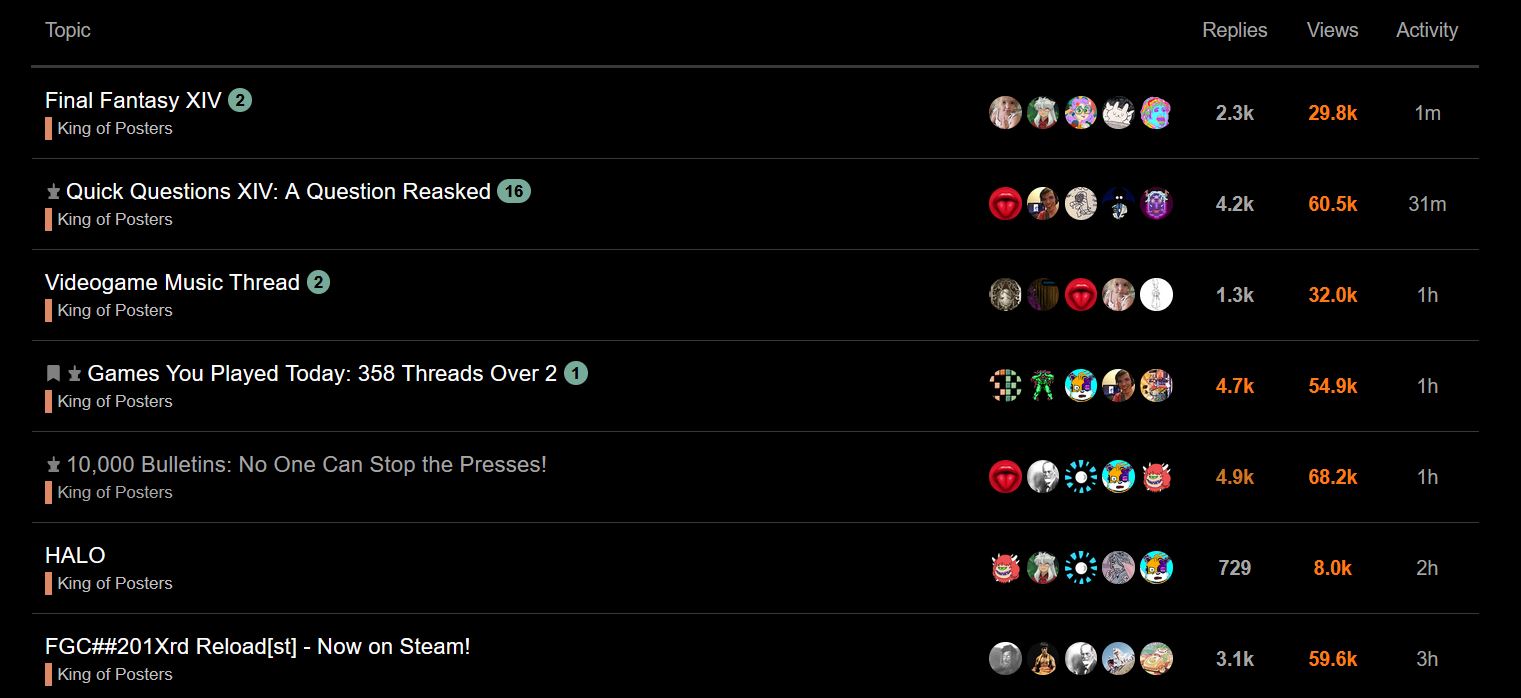
However, on the One Coin theme, the bug is still occurring:
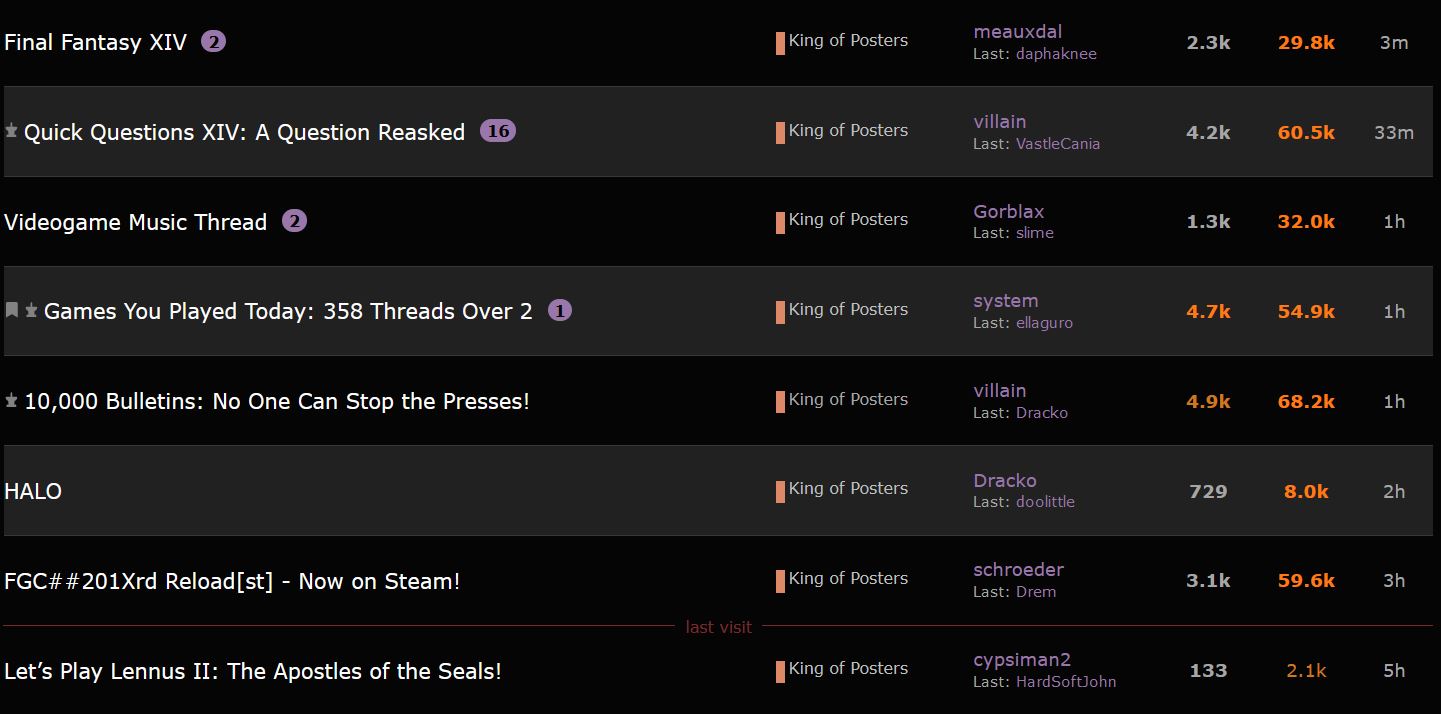
I’ll test the other themes and list the ones that work and don’t work, in case it’s helpful.
I know it sounds like this issue may be unresolvable, but I figured I’d share this clue in case it cracks the puzzle… and so that anyone affected by the bug has more alternatives to consider.
4 Likes
OK, so here’s the rundown.
Themes where thread titles successfully change color when fully read:
- Nise SB
Themes where thread titles do not change color when fully read:
- One Coin
- 199X
- Bevel Grey
- Black Market Banana
- Blueberry
- Chewing Soul
- Default (as of last week)
- GAME IS GOOD
- Halloween 2020
- mauve’s Blue
- mauve’s Mauve
- Tartarus
- VastleCania’s Virtual Boy
- White Belt
…Uh, ok, so it looks like ONLY the Nise SB theme still has this feature working properly. What is it doing that the others aren’t? I notice it also has posters’ icons listed next to thread titles instead of original and last posters’ names… But that may be totally unrelated. Seems this theme does a lot of unorthodox things.
3 Likes
Yeah the CSS on that theme is wild, avatars are tiny and sig files are GIGANTIC. I couldn’t handle it.
2 Likes
OK, so I looked at the Nise SB theme and the default theme in the web console, and here’s what I found:
For fully-read, grey thread titles, Nise SB uses the following CSS:
.topic-list-item.visited .topic-list-data,
.latest-topic-list-item.visited,
.category-topic-link.visited {
  a.title:not(.badge-notification) {
    color: var(--primary-medium);
  }
  span.badge-category {
    color: var(--primary-medium);
  }
  a.discourse-tag {
    color: var(--primary-medium);
  }
}
Meanwhile, for ALL thread titles (fully read or not) the default theme uses:
.topic-list-main-link {
  font-size: $font-up-1;
  a.title {
    padding: 15px 0;
    word-break: break-word;
    color: var(--primary);
  }

  .anon & {
    a.title:visited:not(.badge-notification) {
      color: var(--primary-medium);
    }
  }

  a.title.visited:not(.badge-notification) {
    color: var(--primary-medium);
  }
}
(btw, for non-read, white thread titles, the Nise SB theme actually uses this same CSS)
So, the default theme is currently applying the --primary color definition to all thread titles, while the Nise SB theme is properly applying the --primary-medium color definition to visited threads.
I’d like to dig a bit further into this. Are there any tips, or is there any special access I would need to help me debug this css? My css skills are OK, but I don’t know how Discourse works at all. If I’m able to fix the issue, how would I go about potentially adding my own theme to the list?
7 Likes
I just remembered that the thread title color functionality does still work properly on the default theme on mobile browsers, so I used the Chrome web console to view the site as if I were using a mobile device. Here’s the CSS it was using (lines 130 to 142 from _topic-list.scss):
.topic-list-item.visited .topic-list-data,
.latest-topic-list-item.visited,
.category-topic-link.visited {
  a.title:not(.badge-notification) {
    color: var(--primary-medium);
  }
  span.badge-category {
    color: var(--primary-medium);
  }
  a.discourse-tag {
    color: var(--primary-medium);
  }
}
It’s the exact same CSS as the Nise SB theme uses on desktop! Makes me think it hopefully wouldn’t be too hard to bring this code over to the default theme’s desktop CSS and make it work.
3 Likes
Nise SB is SB without most of the override components applied, that’s why it presumably functions correctly, though, I never knew thread titles were supposed to change color.
I have a week off at the end of the month, I’ll go clean up all of the CSS and remove the older themes I don’t want to update anymore, as well. Default, Bevel Gray, Light Theme, One Coin, Mauve’s Mauve/Blue, and VastleCania’s Virtual Boy will remain.
8 Likes
Awesome, thanks!
daphny’s gonna be gutted. long live one coin tho
So this is may be a case of me going “is this new or have things been like this the whole time without me noticing” but at least in King of Posters I have the three pinned topics at the top of the page (game playing, news and quick questions) and… the one with the most recent post used to move to the top of the three, right? I just was on the page and saw Quick Questions as the only one with a new post since my last visit but still in the third spot and it felt… wrong.
good sleuthing butts, love to see it
3 Likes
truly, i’m in awe
for my part i’m a little dismayed at the reduced information available now that you don’t see new post numbers alongside old-but-unread post numbers but it’s probably for the best otherwise my screenshots would drive Cubes to an early grave
1 Like
Don’t worry I’m headed there already