yeah son, get on it
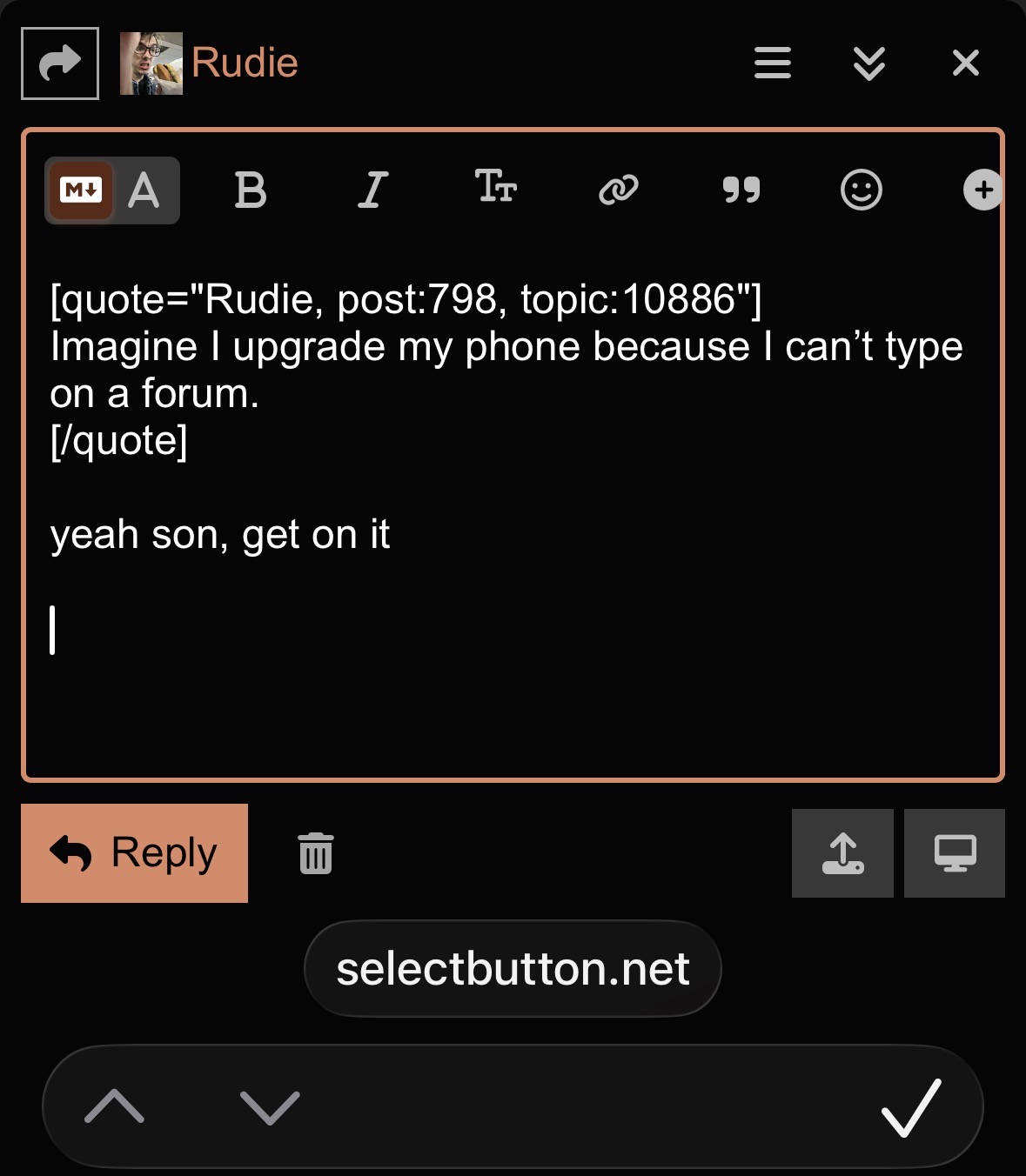
what the hell is that bar with the arrows and the checkmark, why is it showing the domain name over the text box, are these things your phone does normally?
3 Likes
From the resolution of the screenshot, Rudie has an iPhone 12 or 13 mini with Display Zoom on, which is why everything is do cramped I think.
2 Likes
oh i’m still on ios 18, is this liquid glass? my first thought was some kind of android thing
i should install it on my work phone
My advice would be to turn Display Zoom off but considering that’s an accessibility feature that’s probably not a solution.
theoretically i am an old hand at fixing overly complicated css, hypothetically i could get to this before any of us dies of old age. my work laptop has ios simulator installed already and i think it has all the old phones so theoretically it would be possible to hook it up to safari dev tools and hack together a solution interactively and then use an affordance in discourse whose name escapes me to make it a part of every theme. this is awaiting a day when i’m already coding at work where i can use it as a procrastination activity. no promises
5 Likes
iOS23, iPhone 13. I have been dealing with a lot of wacky text box schenigans for about a year now. I mentioned the other one, which is the input text box was just a single line.
The URL and arrows and checkmark are both iOS23 additions that the only thing they do is cramp what I can see when I am writing a post.
Thanks for considering looking into this!
2 Likes
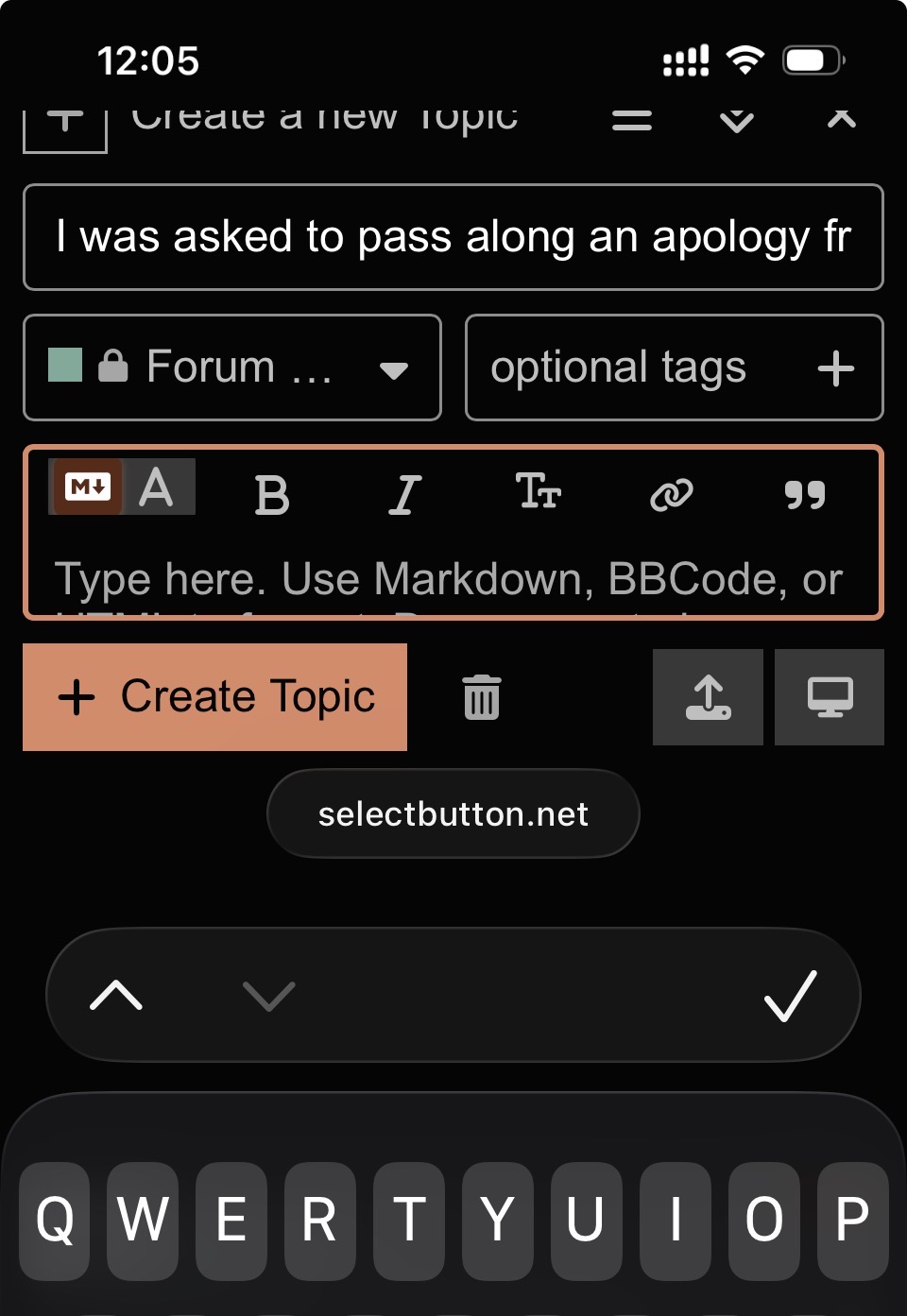
Just having all kinds of unique problems now. It did the one line thing today! And now, while I try to write a longer post, it starts scrolling back in the thread and reloading, it just did it just now. Going to maybe clear my cache and window and see what happens. And it reloaded again before I could hit reply.
1 Like
i wonder how well this app works with sb
my work has been insanely stressful lately lol
it’s quite possible that this app will give you the same problem but in a webview in a different app but it seems like it’s worth a shot
3 Likes
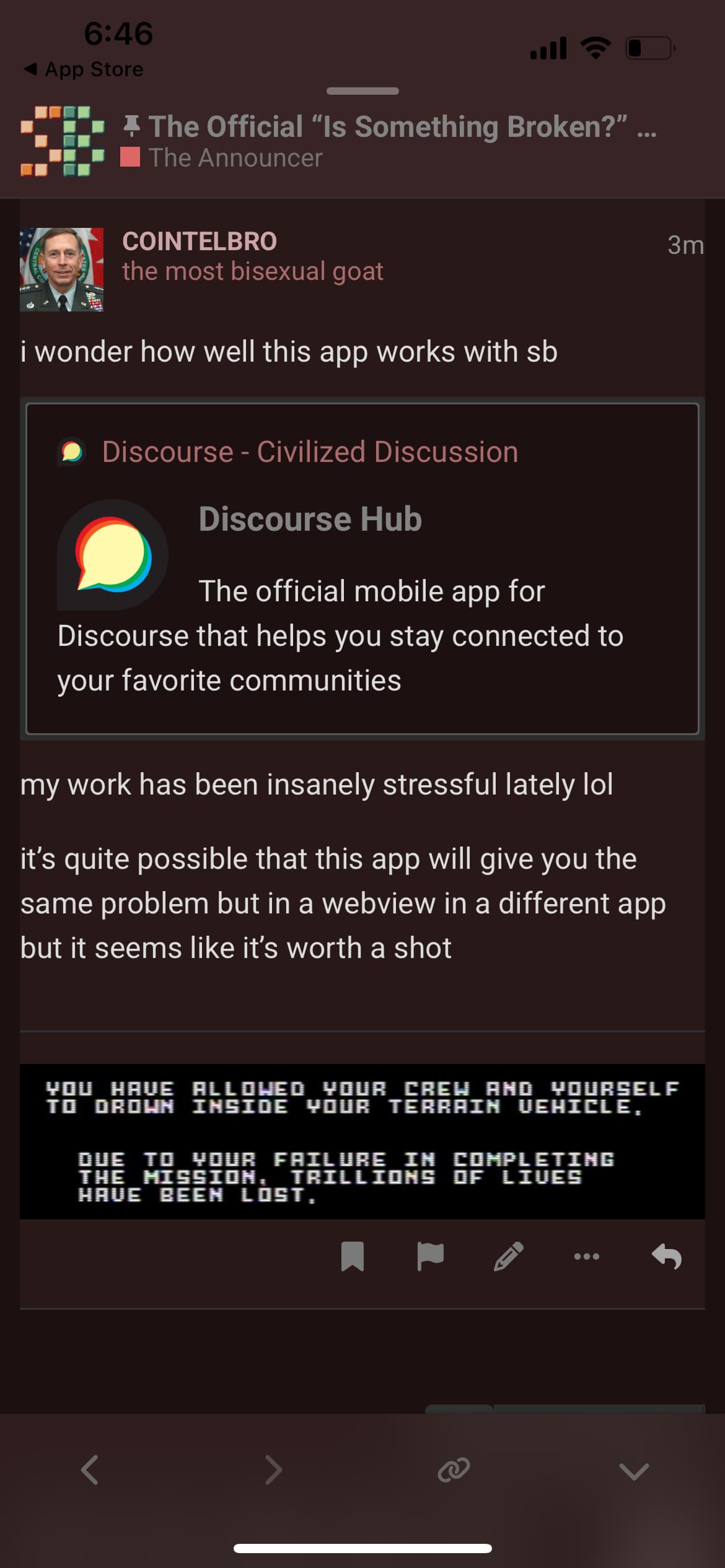
ohh that’s neat the theme colors extend to the edges of the display
is the form field still fucked up for you in the official discourse hub app?
1 Like
Embeds aren’t working at the moment.
This isn’t coming up embedded
but it did just a few minutes ago
Update 4/28: After clicking edit and save today it’s working now ^ _^
1 Like
what browser are you using? i may be able to help with this
discourse is lame and only shows your ip address, not your user agent
discourse meta discussion says that i can look at the nginx logs for that, which i probably should just so i can see if they’re turned on, but i don’t have access to adderall and i’m cutting back on caffeine lately and it would be way more convenient if you told me
although we get like 8k pageviews a day so it would be a cool way to test out log aggregation software
then i could do a weird user agent show and tell as a bonus
5 Likes
Thanks, I’ll have to take phone screenshots and send them to myself, in order to upload and post them here from someone else’s computer. In the phone side of things, it’s because my iPhone is woefully out of date, and I don’t want to upgrade it when I’m bleeding out money in other fronts. In my old computer, it’s because most browsers stopped supporting and updating it. My computer is so old that it came with Windows 7 back in 2009.
At one point even those official Free YouTube Movies TM stopped loading in it, because Chrome stopped had supporting updates for it, and the latest Firefox I could have installed on it, lagged and froze constantly for any Free YouTube Movie TM upload, even using third party players like stream rooms, that bypass the ads, in case it was Google targeting any of my ad blockers.
1 Like
it’s unfortunate that discourse officially supports only the latest versions of the major browsers
discourse comes with an api though so you can technically access select button with apps like discorkie https://discorkie.appoutlet.dev/ or discourse hub
it would be nice to try to make a kind of discourse proxy for low end computers or people with bad satellite internet connections or whatever, something that would serve it as a variation on the most basic possible depiction of a web forum
7 Likes
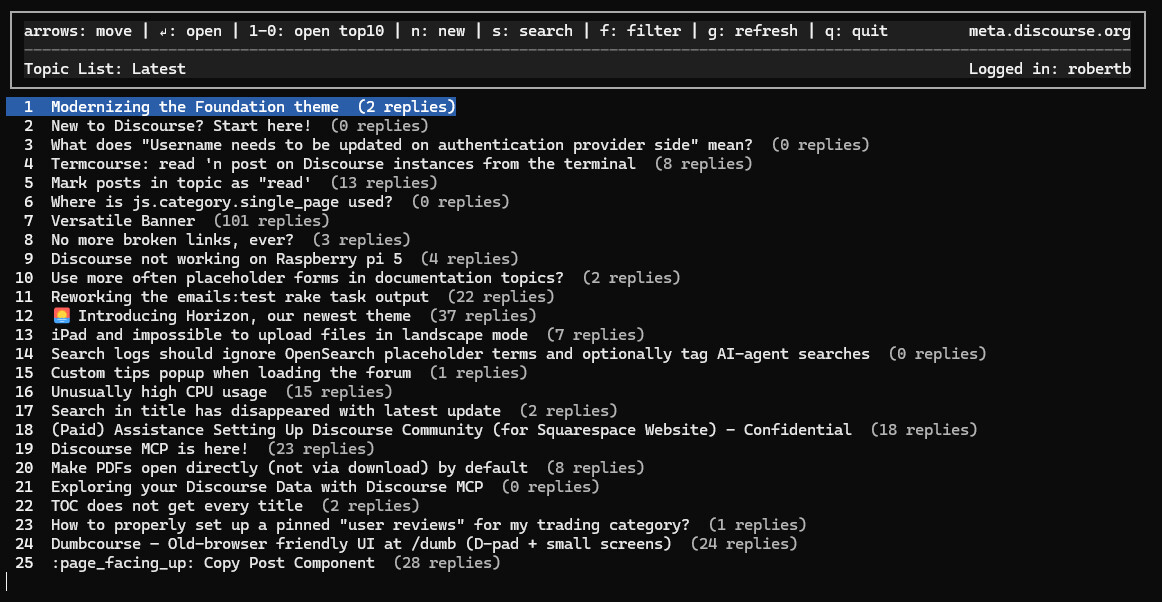
this is now my blanket recommendation for all problems with discourse’s UI, just use it like a BBS. it supposedly has image support if your console supports sixels
10 Likes
oh right, the certificate tells you when it’s going to expire. i may or may not be able to get to this before the next time TLS breaks at Tue, 09 Jun 2026 17:16:52 GMT
1 Like
perhaps this will be helpful to other dropbox GIF-slingers like me: to embed those links in spoiler/hide details, while still getting them to show up as images and not link text, bookend the links with [ img] and [ /img] (remove the spaces after the brackets, had to add those to get them to show up)
2 Likes
Summary/repro steps:
- In Firefox (Windows 11), Click the magnifying glass icon in the upper-right corner of an SB forum page
- Enter a search phrase
- Middle-click one of the thread titles in the resulting drop-down list
– The thread URL opens in the new tab with “null” appended to it, resulting in a “Oops! That page doesn’t exist or is private” SB page instead of the thread.
~ ~ ~
TLDR:
I have my mouse wheel’s click set to “Middle Click”–in modern web browsers, this tends to open a link in a new tab.
In Firefox (Windows 11), this used to let me click the magnifying glass “search” icon in the top-right corner of SB, enter a search phrase, and then middle-click the titles of the resulting drop-down list to open those threads in new tabs.
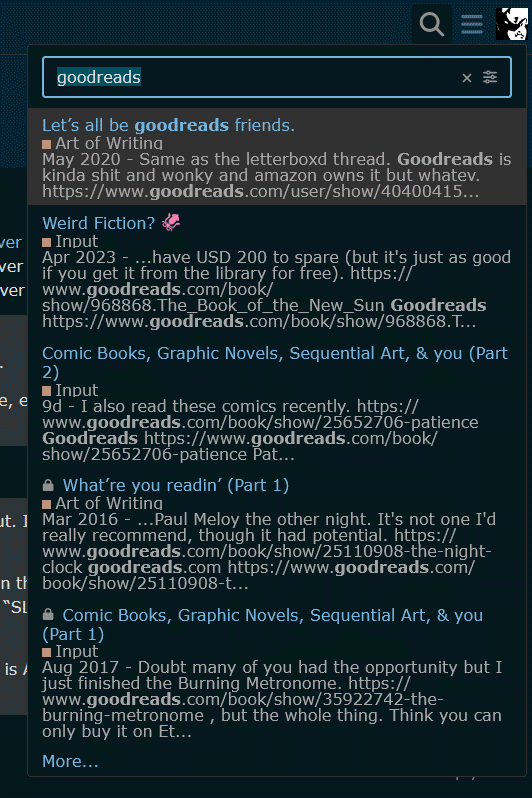
In the past several weeks–maybe more like a month but I’m not sure about that–instead of this browsing process resulting in the listed thread opening in the new tab, I get a “null” page:
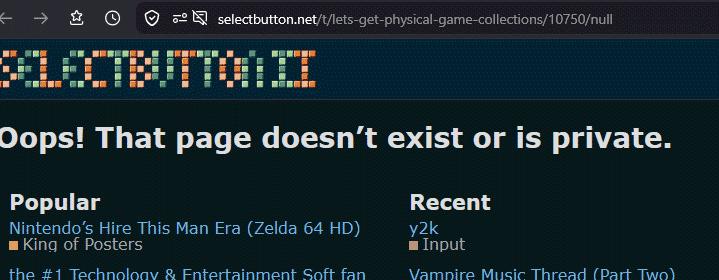
^ Note that the correct URL is in the address bar, but with “null” appended to it. If I delete “null” from the end of the URL, the SB thread loads correctly. (I don’t know if “null” was always resulting from opening SB threads this way and the forum just ignored it before–I don’t think “null” WAS in the URLs before, but that’s another thing I’m not sure about.)
If instead of middle-click I right-click a thread title in the search results drop-down list and select “Open Link in New Tab” from Firefox’s pop-up menu–or just left-click the search results thread title, for that matter–the thread opens correctly, without the “null”–“null” only happens from middle-click, which is something I’ve never run into before on any site.
This is in Firefox in Windows 11, and only with thread titles in that search results drop-down, not with other links on SB pages. In Chrome, the “null” thing doesn’t happen, and the middle-click works fine. So, this could be some weird change in Firefox, or maybe I busted my Firefox install somehow–but this isn’t a behavior I’ve run into on any other site, so I dunno about that.
The “Let’s all be goodreads friends” result shown in the first image above shows as https://selectbutton.net/t/lets-all-be-goodreads-friends/10192 in Firebox’s statusbar when I mouseover it, but opens to https://selectbutton.net/t/lets-get-physical-game-collections/null on middle-click.
I guess it’s probably a Firefox thing but darned if I can tell what. Googling “firefox null url from middle-click” suggests
When middle-clicking a link in Firefox results in a “null” URL (often rendering as
javascript:void(0)or a dead page), it means the website uses a non-standard script on its buttons instead of a direct link. The browser executes this script instead of a standard URL navigation.
which it appears to have gleaned largely from
https://www.reddit.com/r/firefox/comments/7rz9gp/open_a_link_with_mouse_middle_click_opens/
but Google’s suggested workarounds (about:config middlemouse or middleclick settings, ctrl-plus-left-click, disabling ad blocker (I’m running uBlock Origin in Firefox) or Firefox’s Enhanced Tracking Protection, checking “Open links in tabs instead of new windows” [in Firefox] (already checked) didn’t fix it.
1 Like
whoops sorry about the temporary downtime due to an expired certificate. i thought i had another day to head that off. still going to look into rebooting the server automatically or whatever later today so i stop having to care about when the certificate expires
6 Likes
ok, from what i gather, certificates are managed by discourse like this
this all happens inside the docker container. what i’m having to do every time the cert renews is restart the nginx server that stands between the docker container and the outside world
i think i found a decent solution with the tools at hand, a script using inotifywait to restart the nginx container every time the certificate file changes, which conveniently already happens in a directory mounted from the host filesystem because discourse is reasonably well engineered
later today i may even make the script into a systemd service. it has only been 325 days since the host restarted after all
4 Likes