This is a very powerful image.
3 Likes
the local Microcenter had a couple Pokken pads available for 10 bucks so I picked them up
they are big and comfy and perfect for dumb SNES stuff and they work as dinput out of the box and my only complaint is that it’s hollow because it has spots for rumble motors and LEDs and even the PCB has points for soldering them on but there’s nothing there
it makes me feel bad that I’m going to take the second one and tear it apart and solder shit to the board and make… something out of it
3 Likes

clean mode is disabling inputs temporarily so you can clean the keyboard
gimmie a copper anti microbial medical keyboard please


15 Likes
Love the “Left Click” and “Right Click” keys!
1 Like
re: keyboardz apparently the unicomp tenkeyless model m is dropping next month
why do keyboard enthusiasts hate numpads lately
2 Likes
these look so fucking cool. i want a god damn industrial ass keyboard
It makes you extend your arms wider than is comfortable while mousing.
I like boards with “embedded” numpads in a shift layer.
I am probably the biggest keyboard weirdo here tho
gonna use my wide load privilege to rage against tiny keyboards
10 Likes
taking the numpad off a keyboard smacks of gamer peripheral bullshit and I won’t fucking stand for it
3 Likes
i’m spoiled by the interoperability of the elecom trackball mouse and steam controller
more devices need to be operational over usb, aa powered when wireless, and work both bluetooth and 2.4ghz via (included) dongle
keyboard and traditional mice manufacturers meet my demands!!! i’m going to pick up a filco convertible which is almost-not-quite good enough
you’d think with all the aftermarket paracord type bullshit some mouse company would have detachable usb mice figured out but noooooo
i think people are going tenkeyless because that’s about the size point at which a keyboard becomes reasonably travellable. i use a minila now and i love it but worry about it’s implications for posture sometimes… i’ve pondered a few of the new fandangled split ergo boards people run with but i’m trying to skew more not less normie; a shiny ruby trackball mouse on my desk has quickly become yet another unwelcome talking point when i’m trying to go about my work unbothered >:/
2 Likes
I sit on my floor and play ff14 on my ps4 with a model m and I will gladly continue to suffer for it
2 Likes


i like the colors of the first one
which ones space which ones enter
do you try and teach people how to use your keyboards or do you have a spare labeled one that you plug in if someone needs your computer
Cardcaptor wand for backspace/delete. Sailor Scout wand for enter/space.
At home my partner’s keyboard supports three saved inputs so she can switch to mine if need be.
At work I have another one plugged in but I am the only one using it most of the time.
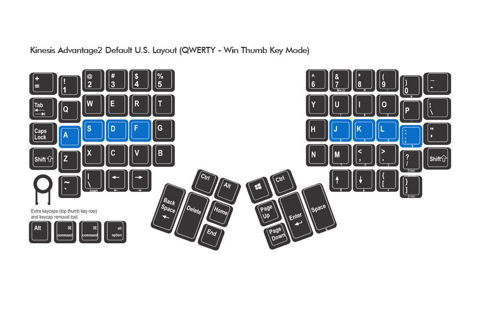
I think left hand thumb for backspace/delete and right hand thumb for enter/space makes sense for L-R languages and moving modifiers off of the pinkies to the thumbs is much more comfortable. The top board also supports press and hold, so you can eliminate the need for shift completely.
Ergonomically, the keys are straight columns (staggered is a holdover from typewriters). The top one is flat, but the second one is concave so each row is roughly proportional to the height of your finger.
(This is all to ameliorate swelling from the rheumatoid arthritis - regular keyboards and controllers aren’t really comfortable anymore.)
3 Likes
numpads suck. i’m not a fuckin accountant or a cash register worker.
I have a fuckin bolt modded model m that I don’t use because it’s too big (and also getting it to work in modern windows is a pain in the ass)
What about rogue
Well, see, you get this thing called a teensy and solder the controller on and flash a matching qmk firmware…
This is a Special Interest, huh
1 Like
numpads are great actually, especially for games
fully symmetrical 8 direction control
works perfectly as a set of arcade buttons. the extra numbers are very comfortably placed macros. the entire set of symbols could also be mapped in most instances i’ve tried. just a very nice looking array of buttons. it also helps that they’re often next to the arrow keys, which kind of creates a nice little control hub on my keyboard.
4 Likes