Intel has caught up more than I realized in terms of IPC on their laptop chips so that they’re not a particularly bad buy relative to Apple for performance as long as you do not really care about battery life. I would probably recommend an arm macbook at that price point in terms of QoL but Blender will work well with any GPU as long as it’s not super underpowered, it has a very idealized reference implementation approach to OpenGL/Vulkan/Metal
Windows ARM still seems like a real worst of both worlds choice (and I would know, I ran an Arch Linux x86 convertible tablet concurrently with a Windows Phone for 3 years), I don’t think I’d buy one for somebody else before reading more testimony
Like if I check the activity monitor on my MacBook I can see that a total of zero x86 processes are running at any given time unless and until I decide to open a Steam game in Crossover in which case they work great. I don’t think the Windows ecosystem can achieve anything resembling that discipline so any battery gains seem a priori negligible
Yeah what led me there was actually looking for OLED screens. That’s a feature I think is really valuable but it seems the only way to get it below $700 is to cheap out on the CPU.
Overall the $600 price range doesn’t seem to be cutting into the bone, but it does seem to cut some amount of muscle, so to speak. The options are a lot easier to recommend with no major caveats above $800 (indeed including the HP laptop RT-55J linked if I add in the optional OLED and SSD upgrade on the customization page).
But I didn’t want to be like “just spend more money” and I’ve always been irrationally optimistic about Windows-on-ARM, so
I’ve been trying to stream from my PC to my Steam Deck with mixed results. While most swear by Sunshine/Moonlight, that runs kinda shitty for me, while native Steam streaming seems to work alright.
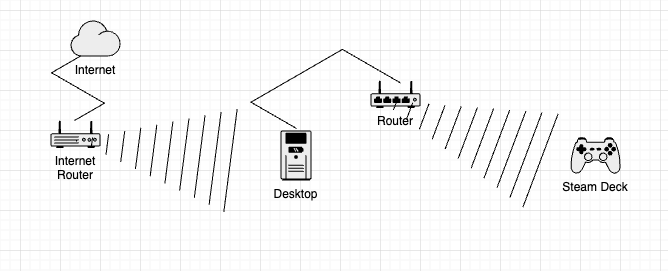
Given there might be congestion on my router, is it possible to…wire a router directly to my PC (hard wiring my actual PC to my internet router isn’t an option), create a network for it that without it being connected to the internet, and have that alone be set to broadcast to my Steam Deck?
Pretty sure the answer to that is “wifi doesn’t work that way” but I guess I’m just spitballin’.
sure, you can do that. you will probably want to have it all as the same network, but with separate SSIDs (wireless network names) so you can force the Steam deck not to connect to the internet router. plus you can use a cheaper switch/wireless Access Point device instead
your router would have to be extremely crap not to keep up with the few Mbps needed for video streaming, or extremely busy. it’s more likely to be signal interference or some dumb incompatibility between the wireless devices
if you wanted to start extremely simply, try attaching a wireless dongle to your desktop and connecting the Steam Deck to its wireless network
My router from AT&T is pretty damn old now, so my signal upstairs to my bedroom ain’t great. I could just run a long HDMI cable to my TV, but…eh…
I do have an old 5 Ghz Asus router that I was using for passthrough (and probably creating half the issues I was having anyway) for a while, but if I can connect that to my PC as a sort of private network, I think it oughta be OK.
Would it be too much to ask to just make one of these without the folding. All I want is a thin and light 10-inch tablet with an OLED screen. It’s absurd that my Galaxy Tab S6 is still the best device to read manga on
Starting to foresee a possible future where my S6 dies and I get one of these overpriced foldables and never bother to fold it
I bought a Remarkable 2 during the pandemic and have gotten a massive amount of use out of it, but I think most of the effort that’s gone into dedicated reading devices around and since then has mostly been for e-Ink which is still useless for comics
Spent a while reading about the sickos who are taking what’s essentially the PS5 APU (the, uh, AMD BC 250, pared down a bit and pulled from crypto mining racks), rigging a case, PSU and fan for it, flashing a custom BIOS to split the shared memory 50/50, and running Bazzite on it.
It looks like it does…OK-ish, with the NVME speeds looking pretty damn slow and I guess the whole thing kinda hampered by the 8 GB/8 GB split, but the demos I’ve seen have it running games fairly well.
I guess if all this shit is gonna be incredibly expensive for a while, getting one of those cards for like $100 on eBay and making do is one way to work around it.
this actually seems pretty significant for the uneasy truce between professional and consumer PC products. Crucial is an extremely reliable brand and if it can’t justify itself then…
It turns out transferring all of your Kubuntu home folder contents to your nixos home folder and then recursively changing all permissions is bad, because while NixOS knows that it uses NixOS configurations, a lot of things NixOS installs including apparently the goddamn login manager do not know and will start trying to use the configurations in your home folder you didn’t think about. So because the process of solving that would have been annoying, and customization makes me feel nice anyway, I am now using a different login manager. Also, I can get Sway working on boot, and it seems to be wayland compatible and flatpak compatible, and I had wanted to install NixOS with just a windows manager originally, but right now I am too annoyed to learn a new thing. But maybe I will come back to that. It remains an interesting idea.
Edit: Leaving this here because SimpleNote isn’t letting me log in from the app right now
it’s a combination of AI datacenter boom and the trump administration de facto cancelling the IRA subsidies which Micron, as the only US-based memory manufacturer, had expected to benefit much more from. the margins on server products are big enough to make up for it but not on consumer products.
Coming back around to this - I got a USB 3.0 WiFi 6 adapter for like $20 on Amazon that’s supposed to be Linux compatible. Plugged it in and already my download speeds are like 3-4 times what they were from my (admittedly very old and probably not great!) built-in WiFi antenna on my motherboard.
Gonna try streaming again in a second, unless my computer is chugging on encoding the video I should be good, without needing to set up adhoc or anything.
who’d have thought that spec’ing every new machine i touch with 32 or 64gb of RAM, plus 1-4tb m2s would turn out to be a good idea so quickly, because now i have the option to e.g. just remove one of the two RAM sticks and put it in another machine to avoid paying AI taxes for the next few years, humhum.
…. too bad you cannot do that on a digital-only console (well aside of plugging in an external drive, due to lame-ass oob-speccing, looking at 800something gb for a PS5 thanks to some Sony-VP-sickos), huh? For the umpteenth time, is this the straw that breaks the camel’s back and we get our long craved Videogame-Crash™ in 202— ah let me keep that thought for the 2026-predictions thread, nvm