Man. Imagine if we passed laws to make ordinary people’s lives better. What an insane concept
European tech regulation is pretty heavy handed at best; they manage to do something more useful than reactionary like one time in four, I would not hold this up as particularly enviable
unfortunately you will find find this opinion stated very confidently outside of like, hacker news, which is pretty repellent to most people for other reasons
Is it actually plausable that integrated graphics of the current gen can outperform laptop GPUs from like 9 years ago? Like. I have the 2 card SLI thing going but I don’t think I can even take advantage of it for a lot of games anyway.
A quick Google search seems to suggest so. And I feel like at this point maybe my processor is the biggest bottleneck anyway.
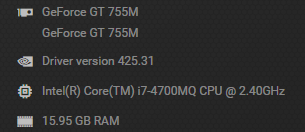
The thing is I’m not really looking to play the AAA titles of today. I just have a significant portion of my existing Steam/Epic libraries that are just a hair too demanding for my current laptop. I’m wondering how cheaply I can get over that hump.

ideally you would gun for something with Radeon 680M, as that’s the only sane iGPU with a considerable uplift in performance
you just need to find a laptop that specifically calls that out instead of a generic “AMD Radeon Graphics” spec. I would tell you to go buy an outlet ThinkPad but those come with 11 Pro preinstalled and if you don’t have a domain to join or if the image they put on there is new enough, you’ll have to do a bunch of running around to actually getting into Windows
but also it’s Christmas, just take that 700 bucks and buy a gaudy-ass looking gamer laptop. if ROG is good enough for Trump’s lawyer, it’s good enough for you
Another maybe dumb Windows troubleshooting question from me. Feel free to ignore:
Every time I start my Windows 10 desktop and sometimes at other points I haven’t figured out a pattern for, I get this error message:
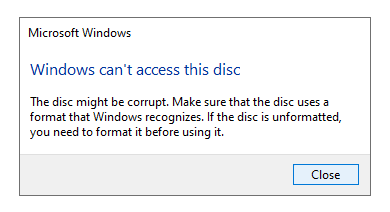
A phantom “CD Drive” shows up in my list of disk locations, and I keep “uninstalling” a “Realtek CD-ROM USB Device” that shows up in my Device Manager every time this pops up.
In Device Manager, the location is: “Bus Number 3, Target Id 0, LUN 0”
I’ve tried to see what this might map to on my motherboard, but my motherboard manual says nothing about that. All my hard drives are showing up and funcitoning properly, including a USB-connected hard drive, and my USB ports all seem normally functional. I had an LG external DVD burner connected via USB, but it broke recently (which I discovered when this started happening). Anyone have any idea how to hunt this down?
Banging my head against the wall all day trying to format an SD card in an ata adaptor as a sub osx hard drive for that powerbook I posted. Never found a way to do it.
It did, however, immediately work when I tried to format it in 10.4.11. All 8 partitions popped right up under os 7.6
Wish I had started there.
it takes almost 3 whole minutes to reset or turn on my computer, and I have no idea what’s going on the entire time. it’s just a black screen until I finally see the windows logon. how did this become an acceptable state of affairs
bios update should fix that, I have the same board and it’s like 4 seconds
I updated the bios first thing before i even had a hard drive for it. But now it doesnt start up at all and just gives me a cpu error red light on the hive module thing with the fans going 100 percent. God damn i love computers!
there are officially no more 2 slot chinese 4090s on ebay so I think the value of this thing has temporarily appreciated to beyond what I paid for it
btw someone please lmk when a lovelace bios editor comes out because I really want to drop this thing’s minimum fan speed from 30% down to like 15%, otherwise it’s actually perfect
Felix and Notbov: Reasonable advice
Me, being a pain in the ass: But I wanna do something weird for my very specific use case
I bought an Ace Magic AM 08 Pro mini gaming PC on a deep Black Friday discount. YouTube reviews and other indicate it ought to accomplish exactly what I want out of a gaming PC for the foreseeable future; i.e. unlocking parts of my Steam/Epic libraries that my old laptop was just a hair too weak to handle, plus even handling some current gen stuff on lower settings if I really get a wild hair up my ass. It apparently runs Diablo 4 with aplomb.
I also got a new old stock Surface Go 2 for those occasions when I need to do email and Microsoft Word away from my desk in my home office. I suppose I can also use it for Zoom calls too instead of relying on my phone on a swing arm. Got a refurbished type cover from Best Buy.
All this plus a couple of accessories wound up costing less than most of the other stuff I was looking at.
I said “Felix I don’t want two computers” so now I have three because the Ace Magic is so small I don’t even need to move my old laptop from its perch and I can take my time transitioning over to the new machine. Or maybe never even use the AM for anything but gaming!
This has been another installment of Mikey’s Idiosyncrasy Theatre
you probably need to reset the cmos in case either your memory profile (I forget what AMD calls it) or your undervolting settings (I also forget what AMD calls those) got thrown off somehow. I found the “ryzen master” desktop application really confusing and unstable compared to just making those changes in the bios.
I wound up just going with an all-core -10 (I assume this value is in mV but the software didn’t actually make that clear) on my 7700x which worked fine and seemed like it would have diminishing returns to fine-tune beyond that, after also applying the preset for a 65w TDP. that keeps it perfectly happy on ITX air cooling without limiting performance at all.
after the initial memory training headache from early X670/DDR5 I’ve actually been really impressed with this platform — I made my fair share of weird assumptions, between having my non-NVMe disks internally dongled on USB headers rather than using SATA, cramming the 4090 in there with the new PSU dongle, and it all works great, and if not for the highish GPU fan lower limit, it would be silent at idle. it’s not silent under load ofc but a 4090 works great at 350w and a 7700x works great at 65w so it’s well within spec for the form factor even so. and the AMD iGPU works fine for additional displays now that those are finally standard on desktop this generation!
it was an overpriced, long-delayed, hard-to-source upgrade, but it was the right one
yeah I took the cpu out to redo the thermal paste at a loss for what else to do but that seemed to reset the bios settings and I think that was what let me bootup normally again, I think maybe it’s the ram settings
Yes, it’s doing memory training. It should only be doing the “I look like I’m dead for a while” thing if you change memory timings, but I hear AM5 boards sometimes randomly forget. The time it takes scales with the amount of RAM you have.
oh don’t tell him that you’ll break his heart
I finally did it and am upgrading my aging PC. Going from an Intel 6600 (Skylake) to an AMD 7700X (picked out an ASRock B650E PG RIPTIDE WIFI AM5 ATX motherboard to go with it).
But I am actually not here to discuss/ask about this setup (though feel free to provide input if you fancy). I’m here to ask what the state of reinstalling a fresh Windows setup is in the year 2023, in terms of getting all your original apps and settings moved over as easily/seamlessly as possible.
I checked and even if I could manage to get 95% of my apps into Chocolatey, Chocolatey doesn’t actually have any knowledge of app preference location, so there’s no easy-peasy selective backup option there. Are we still forced to choose between selectively finding each app’s preferences folder and backing them up individually; or just slamming your entire user folder into the new install and accepting that a decade+ of old, unnecessary crud is coming along for the ride? Would doing the latter affect performance/have any risks associated with it? I can’t think of why it would or why there would be, but I’ve been surprised before, so.
On a separate but semi-related note, is there some easy way to have Chocolatey automatically scan my installed apps, and attempt to adopt all possible apps? And possibly even report back to me which ones are leftover and couldn’t be adopted?
I, fortunately, already have my steam library, and most of my games in general, on a separate drive so I can just leave that alone and then adopt it on my new install. (Still have to worry about the whole preferences/saves thing there though)
Also, I’m currently on Windows 10, but now that I’m going to be moving to a modern system with a TPM chip, I will be eligible for Windows 11. Are there any caveats or unexpected pitfalls here, or is this just a straightforward upgrade?
Sorry this is coming a week later. If it happens again, you might be able to find more detailed information on the error in the Event Viewer. I would strongly suspect a misbehaving device driver; if so you might need to uninstall it from a different place than the Device Manager, like if you can track it down in Add/Remove Programs (Windows 10 still works this way, right…?  ). It’s been years since I did Windows support and I use Linux at home, so I may be rusty or out-of-date, but if it does happen again, I might be able to help you track down the error in the Event Viewer and pinpoint the misbehaving system component.