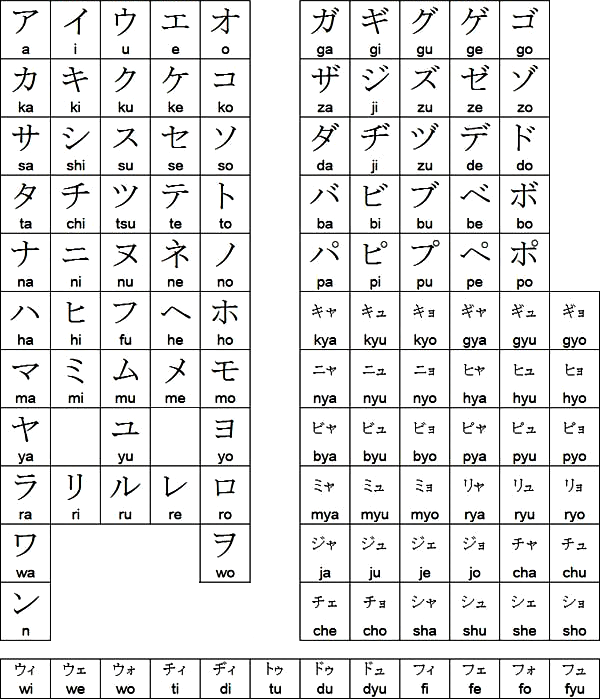
Anybody have a good katakana chart? Trying to bone up a bit, had this down better in the ol’ importing days. =p Anyway I went googling and the best I could seem to find was this one I swiped off Facebook and sharpened up a bit
the one on the tofugu learn katakana page is shmick enough for b+w, but if you’re a motivated autist and you make good use of that page and a quiz app you might not even need a chart
like your ツ and シ etc could take a minute to reliably distinguish of course and i’m a huge mnemonic booster in general after learning kana through that site but
Oh yeah I’d forgotten about the ones that are that similar looking.
I want to have a chart handy as reference on my PC screen while I’m playing games on it that are in Japanese, so I suppose the size of that one above that I fished off of Google is what seemed to me about the right size of being able to move around the screen and even task-switch over games for easier side-by-side translation.
This chart looks good to me. It’s accurate, in the standard order, and the font is similar-looking to what you’ll see in most games.
By the way, if you’re interested in other stuff to put side of your screen to assist your understanding, the Japanese learner community has been building a ton of free apps for all skill levels lately. Personally, I use owocr for scanning images of text into the clipboard, and Yomitan to automatically look up the clipboard contents in all my dictionaries at the same time.
Poke around on GitHub and you’ll find a lot of other variations: for example, for the most common visual novel engines, there are tools to extract the text directly instead of OCRing an image. Especially when you start learning kanji, looking them up in a dictionary unaided takes an eternity, so I’m a big believer in going cyborg.
Ah cool–and thanks for checking the chart. : ) Yeah I’ve just been using Google Translate on my phone which is fine and all except that if I’d been stumbling through the katakana myself instead by now I’d probably be able to get through it unaided so I figure I should probably start on that; I haven’t played much in recent years that had a ton of Japanese but two of the golf games I just got seem to have a fair amount of katakana.
When I translated DLC wrestler names for Fire Pro D a little while back I used this open source thing called Translumo for OCR, but it was fairly unreliable and I had to back it up with Google Translate a lot. ; D So, I dunno maybe that’s a bad one so I won’t link to its GitHub hehe. Besides I think I’ve seen people here post like fancier screen autotranslate stuff they’ve used for RPGs and things.
Yeah, owocr is the state of the art. Until a few months ago I used an older one called MangaOCR actually, but owocr is much better.
And yeah the great thing about the learner-built open-source tools on Windows is that they’re thoughtful about helping you improve your Japanese from what you read, not just provide an immediate shortcut. They get rid of all the busywork but preserve the essential friction of actually engaging with the text.
Hiragana and Katakana I beleive are best learned by making physical flashcards and studying them for a week as often as you can. When it comes to alphabets you gotta just do it.