most likely you wouldn’t, the space is just really up in the air right now because we got to a point where high end drives were just barely touching the limit of 4xPCIe3 and now that we have double and quadruple that bandwidth coming soon it’s an open field
4xPCIe5 is going to be equal to 16xPCIe3 which was maximum GPU bandwidth until last year and consumers generally do not need to have storage that’s 30x as fast as the minimum throughput that software is designed for
this thing just arrived, honestly impressive colours, little bit of backlight leak in the top right, two 3.5mm jacks the manual doesn’t mention, stand too short for an HDMI cable, about as expected lol
Hey it’s another Recommend a Router post. My router was current a decade ago but now I think it’s the main bottleneck for my household’s internet traffic (roughly 18 devices across 6 people) so I want to get a good current router before I start accusing my ISP of throttling me or whatever.
So what I should be looking at/give me recommendations, please.
if you can’t manage to look it up (which is pretty rare tbh, most every motherboard still has some extant manual you can google somewhere) it’s probably at a point where support for it was either nonexistant or so normalized that it didn’t bear mentioning
There’s a mention of “channels mode” in the BIOS menu listing, but other than that I’m not seeing anything conclusive. It would seem kind of silly to have two RAM slots and not enable multi-channel for it, right?
I got an Earmen Donald DAC and iLoud Micro Monitors for C$300 total this week and feeling pretty happy about it, finally have a cheap-expensive audio setup that’s enough better than bluetooth for me to use it
(reason for this question is that younger brother has asked me what a good DAC would be, and i have been pushing back on buying one for a while now, and am kinda forced to look into it atm.
Dual-use for mobile devices (smartphone, tablet) via USB-C port is not required, but would be cool, since newer ultrabookies are tansitioning to USB-C anyway (and, tbh, my Deskmini A300 has a free/unused - C port, ).
Red/Blue Dragonfly has/brings an adapter anyway, so have that marked as a potential contender.
What else is out there that is worth plunging down $$$?
well, the main reason I got this one is because a guy was selling it on craigslist, and mid-end electronics retail here is terrible – what looks like 25% off of MSRP winds up being like a full 50% off what I’d otherwise end up paying with shipping etc to Canada.
but it’s also well reviewed and small and USB powered and just has RCA out which is all what I was looking for anyhow.
oh yeah actually my current setup is an LG monitor and a pair of Logitech speakers, is there some kind of HDMI box that can switch between inputs and do a middling-to-decent DAC job of the audio (just not having line noise audible at low volume is what i’m after atm) and doesn’t introduce latency? while being like … cheap? is this a pipe dream
there’s one app I like that can actually clone a booted windows partition without much fuss (as opposed to having to use eg gparted) but I’m having trouble remembering the name
Samsung and WD both provide programs on their websites that will ghost a drive for you to their drives(in WD’s case, iirc it’s just a WD limited version of Reflect)
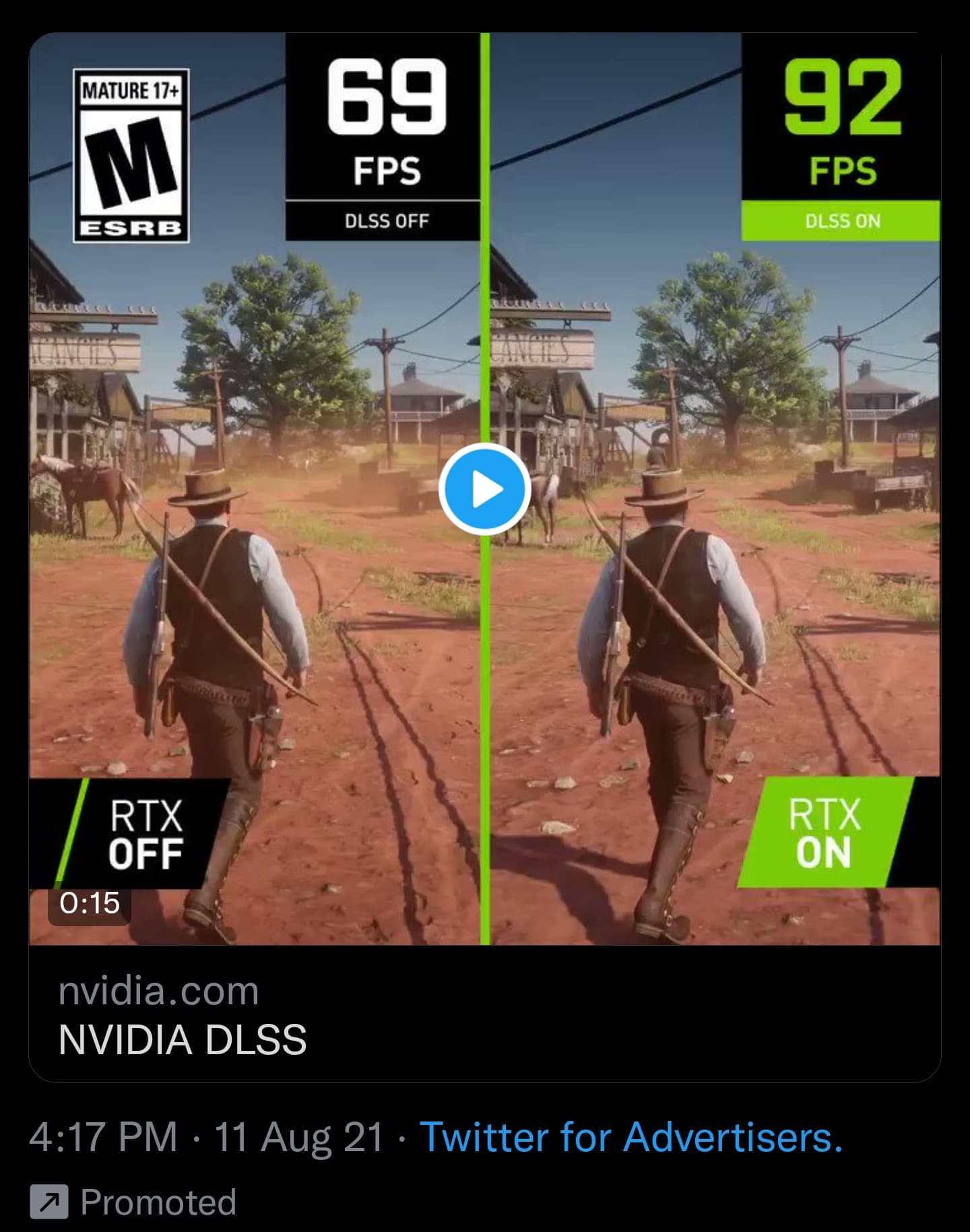
feeling like a lot of these high-end graphics comparisons recently just feel like two pictures of the same place taken at slightly different times of the day or w/e
also really confused by Nvidia bundling raytracing and upsampling under ‘RTX’. Red Dead 2 got a DLSS upsampling patch but not new graphical features so the right side is really just the game rendering at a much lower resolution and upsampling (although yes, it does look clearer than a native presentation and it fixes a lot of the motion blur of the normal temporal anti-aliasing method).
this was apparent with their RTX voice stuff, which works on not-RTX cards (technically so does their raytracing extensions but don’t worry about that)
For old pc games it’s not possible to render them in a lower resolution and just upscale that to your monitor resolution is it? Not some nvidia control panel setting I just don’t know the name of? Is there any way that dlss stuff is going to work that way someday, so I can play max payne 1 or whatever at 640x480 without messing up my window sizes in widows or still being able to use the reshade crt effect
 ).
).