I suspect in MS’s minds limiting the number of CPUs they support for consumer OS makes them nimble “like Apple”
2 Likes
let me link the Surface Studio 2
it is a current, supported and sold product
it costs 3500 dollars
it does not support 11
6 Likes
Windows 11 is designed and built as a complete set of experiences
You’ve already lost me
11 Likes
Ready for the inevitable kr4ck3d version that has all the telemetry stripped out and runs on a Core 2 Duo.
5 Likes
preliminary report: alt-tab not darkens the background completely instead of being dark but clear and super-tab is some bastard child of 10 alt-tab and super-tab
I hate it
3 Likes
yeah i’m trying this win11 insider build
seems alright but i can’t get the taskbar the way i want it yet
i dig the rounded windows at least
some more win11 notes
to revert the touch-friendly Explorer UI changes: File Explorer > Folder Options > View > check “Decrease space between items (compact view)” > Apply
lots of little UI improvements, but the taskbar in particular is a bit of a step backwards currently. i don’t seem to be able to just straight up duplicate it on both monitors which is ???
monitor disconnect/reconnect experience is vastly improved
new window tiling/snapping behavior works very well
i guess i don’t use alt-tab enough, change didn’t seem like a big deal. can still see behind it. i don’t use super-tab and i’m confused by how it even works in win11 lol
if you’re rocking a copy of windows activated by, ahem, alternative means, be aware that you’ll be disactivated after installation completes. even so, my ancient copy of kmspico still seems to work in win11
does reverting from a preview build require a full reinstall or can it be rolled back somehow? I feel like I ought to use it as a “please release this on 7th gen Intel chips, look at how okay it is” data point, but also I don’t want to fuck around with backups on Windows right now
not that i saw. attempting to turn off windows insider after moving to 11 asks you to do a clean reinstall of 10
1 Like
yelling into the void that my taskbar is stuck on the bottom
stop telling me how to use my computer
impressed that PSO2NG has an AutoHDR tonemap already done and that it crashes at the title screen
4 Likes
the taskbar is definitely a pain point thus far
can you really not just have the same taskbar on both monitors anymore? when i turn on duplicate it just gives me a blank one on my off-main
welp gonna need some kind of classicshell for this again lol
oh wow i crashed the Settings app by clicking on “Accounts”
4 Likes
is windows 11 just bringing the xbox-on-pc experience to the rest of windows
2 Likes

7 Likes
okay, @doolittle @BustedAstromech
I literally added retroarch to the Windows game settings page as a desktop app and as it stands right now, once you configure d3d11 or 12 as the renderer, AutoHDR activates
3 Likes
sweet, we need a new PCGamingWiki hero
Does this command still work?
You can enable a splitscreen mode where the left side shows the original SDR content and the right side shows the Auto HDR upgraded content.
This is only for advanced users but if you want to give it a go, here’s how:
- Open an admin command prompt
- To enable splitscreen, run the following command:
reg add HKLM\SYSTEM\CurrentControlSet\Control\GraphicsDrivers /v AutoHDR.ScreenSplit /t REG_DWORD /d 1
- To disable splitscreen, run the following command:
reg delete HKLM\SYSTEM\CurrentControlSet\Control\GraphicsDrivers /v AutoHDR.ScreenSplit /f
so the splitscreen thing works but it’s not showing a diference and also I can’t get RA stable enough to load anything
let’s see the nightly makes things better
okay HDR is definitely being applied since it’s blown out on my SDR display but I can’t tell if this is just the standard Windows SDR slider or if it’s actually shoving AutoHDR stuff in (I’ve had this issue with mpv)
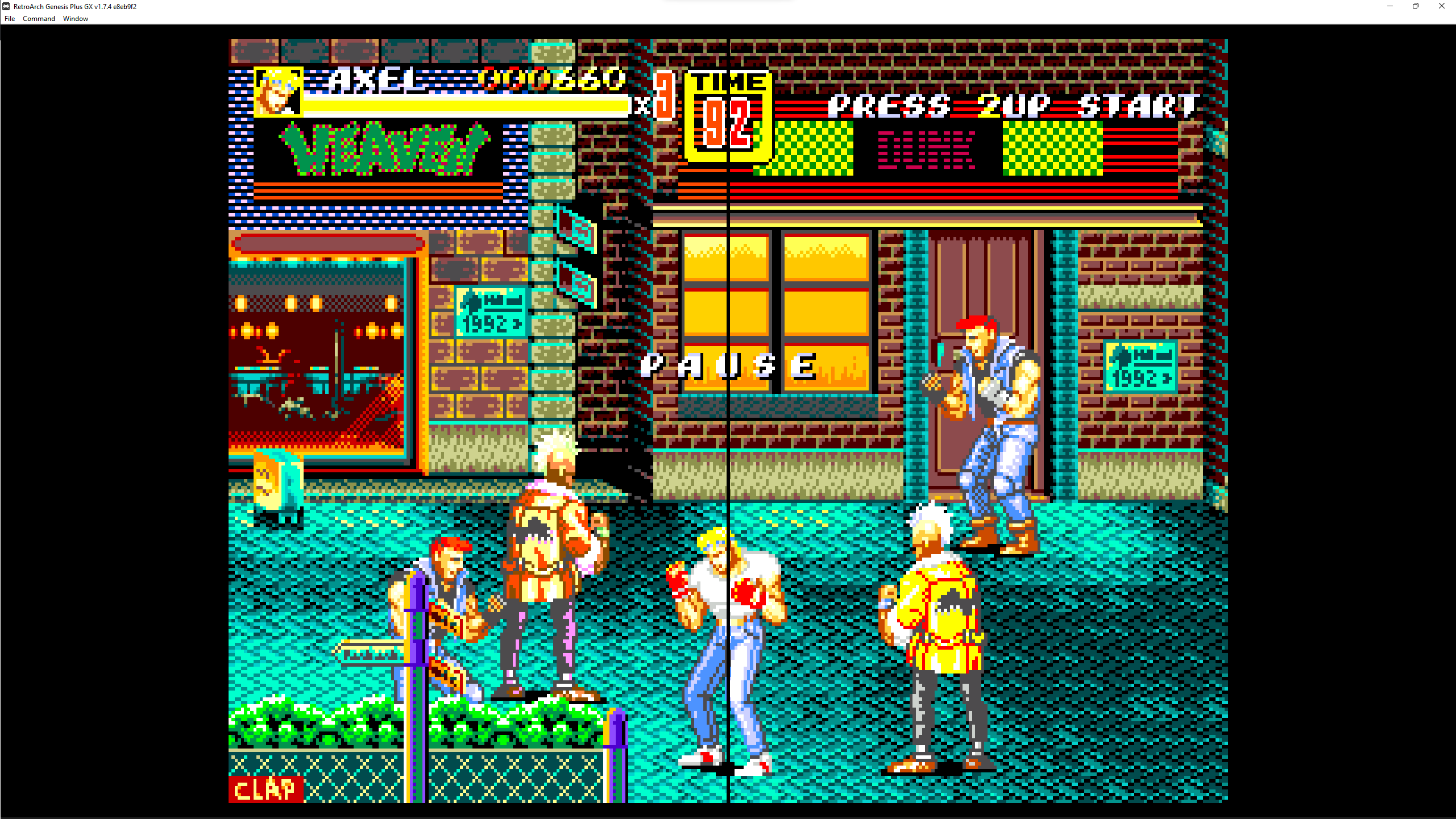
edit: looking in another game, I can see the minor difference, I may have set the SDR slider too well
3 Likes
I think at the moment, you can’t just add anything and expect it get AutoHDR but some stuff works that shouldn’t so there’s probably a switch somewhere to tell Windows to Just Do It
I’ve been in the world of HDR for 17 years and still don’t know what it is or why I want it.
6 Likes